










Photoshoot API
AI product photography API
Send one product photo, even a flat lay on the floor, and say what you want. Garmo makes new photos: the product in a setting your prompt describes, or worn by a Garmo model, your own model or one Garmo picks, in planned poses.
Test keys are free and need no pack.
- A prompt in any language, or none and Garmo plans the set.
- On a model: Garmo’s models, your own, or "auto".
- 1 to 4 images per request, each a different angle or pose.
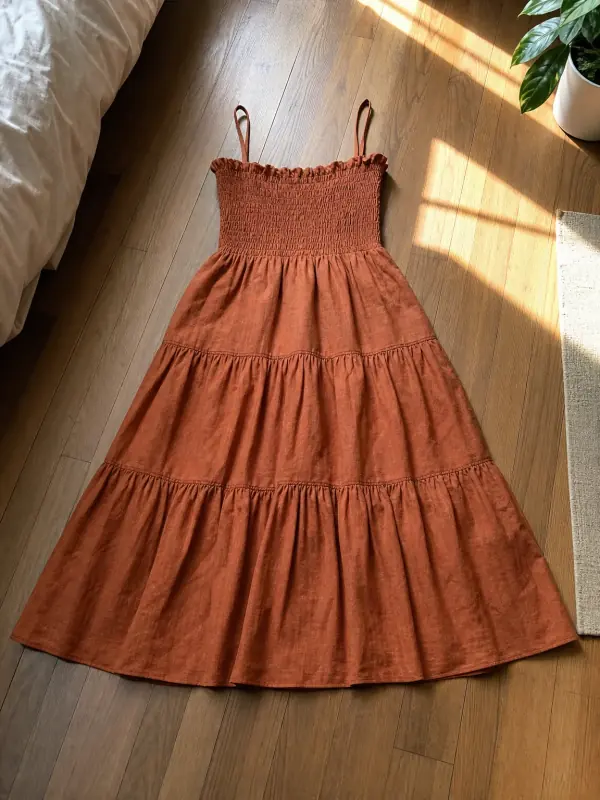
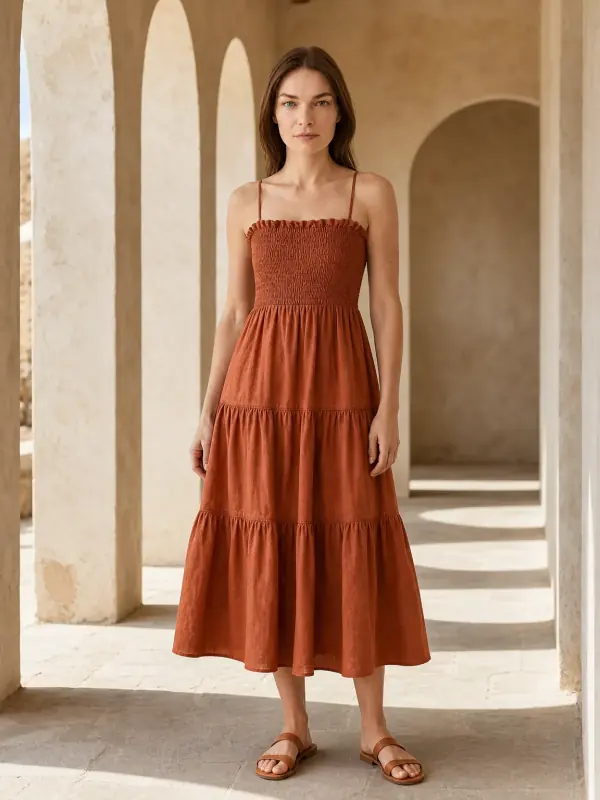
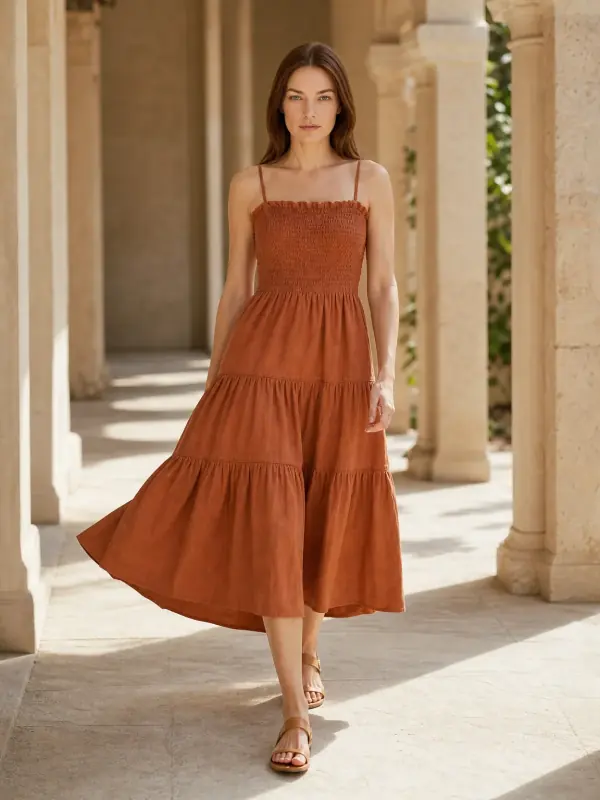
{
  "model": "auto",
  "prompt": "a sunlit stone colonnade, warm late-afternoon light",
  "count": 2
}
One request
Every request is asynchronous: the request returns a job in about two seconds, the images follow in 20 to 90 seconds by webhook or by polling.
curl https://api.garmo.studio/v1/generate \
  -H "Authorization: Bearer $GARMO_API_KEY" \
  -H "Idempotency-Key: $(uuidgen)" \
  -H "Content-Type: application/json" \
  -d '{
    "image_url": "https://shop.example/products/sundress-41.jpg",
    "model": "auto",
    "prompt": "a sunlit stone colonnade, warm late-afternoon light",
    "count": 2
  }'
const r = await fetch("https://api.garmo.studio/v1/generate", {
method: "POST",
headers: {
Authorization: `Bearer ${process.env.GARMO_API_KEY}`,
"Idempotency-Key": "order-123-generate",
"Content-Type": "application/json",
},
body: JSON.stringify({"image_url": "https://shop.example/products/sundress-41.jpg", "model": "auto", "prompt": "a sunlit stone colonnade, warm late-afternoon light", "count": 2}),
});
const job = await r.json();
console.log(job.id, job.status);import os, requests
r = requests.post(
"https://api.garmo.studio/v1/generate",
headers={"Authorization": f"Bearer {os.environ['GARMO_API_KEY']}", "Idempotency-Key": "order-123-generate"},
json={
"image_url": "https://shop.example/products/sundress-41.jpg",
"model": "auto",
"prompt": "a sunlit stone colonnade, warm late-afternoon light",
"count": 2,
},
)
job = r.json()
print(job["id"], job["status"])<?php
$ch = curl_init("https://api.garmo.studio/v1/generate");
curl_setopt_array($ch, [
CURLOPT_RETURNTRANSFER => true,
CURLOPT_POST => true,
CURLOPT_POSTFIELDS => json_encode(["image_url" => "https://shop.example/products/sundress-41.jpg", "model" => "auto", "prompt" => "a sunlit stone colonnade, warm late-afternoon light", "count" => 2]),
CURLOPT_HTTPHEADER => ["Authorization: Bearer " . getenv("GARMO_API_KEY"), "Idempotency-Key: order-123-generate", "Content-Type: application/json"],
]);
$job = json_decode(curl_exec($ch), true);
echo $job["id"], " ", $job["status"];require "net/http"
require "json"
uri = URI("https://api.garmo.studio/v1/generate")
req = Net::HTTP::Post.new(uri)
req["Authorization"] = "Bearer #{ENV.fetch("GARMO_API_KEY")}"
req["Idempotency-Key"] = "order-123-generate"
req["Content-Type"] = "application/json"
req.body = <<~'JSON'
{
"image_url": "https://shop.example/products/sundress-41.jpg",
"model": "auto",
"prompt": "a sunlit stone colonnade, warm late-afternoon light",
"count": 2
}
JSON
res = Net::HTTP.start(uri.host, uri.port, use_ssl: true) { |http| http.request(req) }
job = JSON.parse(res.body)
puts job["id"], job["status"]package main
import (
"fmt"
"io"
"net/http"
"os"
"strings"
)
func main() {
body := strings.NewReader(`{
"image_url": "https://shop.example/products/sundress-41.jpg",
"model": "auto",
"prompt": "a sunlit stone colonnade, warm late-afternoon light",
"count": 2
}`)
req, _ := http.NewRequest("POST", "https://api.garmo.studio/v1/generate", body)
req.Header.Set("Authorization", "Bearer "+os.Getenv("GARMO_API_KEY"))
req.Header.Set("Idempotency-Key", "order-123-generate")
req.Header.Set("Content-Type", "application/json")
res, err := http.DefaultClient.Do(req)
if err != nil {
panic(err)
}
defer res.Body.Close()
out, _ := io.ReadAll(res.Body)
fmt.Println(res.Status, string(out))
}import java.net.URI;
import java.net.http.HttpClient;
import java.net.http.HttpRequest;
import java.net.http.HttpResponse;
public class Garmo {
public static void main(String[] args) throws Exception {
String body = """
{
"image_url": "https://shop.example/products/sundress-41.jpg",
"model": "auto",
"prompt": "a sunlit stone colonnade, warm late-afternoon light",
"count": 2
}
""";
HttpRequest req = HttpRequest.newBuilder(URI.create("https://api.garmo.studio/v1/generate"))
.header("Authorization", "Bearer " + System.getenv("GARMO_API_KEY"))
.header("Idempotency-Key", "order-123-generate")
.header("Content-Type", "application/json")
.POST(HttpRequest.BodyPublishers.ofString(body))
.build();
HttpResponse<String> res = HttpClient.newHttpClient().send(req, HttpResponse.BodyHandlers.ofString());
System.out.println(res.statusCode() + " " + res.body());
}
}{
"id": "job_8Kq2xV7mPz4LtR9wNc3B",
"object": "job",
"tool": "generate",
"status": "completed",
"livemode": true,
"outputs": [
{
"id": "out_1",
"status": "succeeded",
"label": "Front",
"url": "https://….r2.cloudflarestorage.com/renders/2026/11/8f3c…0.webp?X-Amz-Signature=…",
"url_expires_at": "2026-11-20T14:00:00Z"
},
{
"id": "out_2",
"status": "succeeded",
"label": "Walking",
"url": "https://….r2.cloudflarestorage.com/renders/2026/11/8f3c…1.webp?X-Amz-Signature=…",
"url_expires_at": "2026-11-20T14:00:00Z"
}
],
"credits_charged": 2,
"credits_refunded": 0,
"metadata": {
"sku": "DR-123"
},
"created_at": "2026-11-19T14:02:11Z",
"completed_at": "2026-11-19T14:02:58Z"
}Parameters
prompt | What you want, in your own words and any language (up to 500 characters): setting, light, props, mood. Without a model it decides everything, including whether hands or a person appear; with a model it is the art direction. Leave it out and Garmo plans the set. |
count | How many images, 1 to 4. Each is a different angle or pose. |
model | Put the product on a model: an id from GET /catalog/models (a Garmo model or custom_<id> for your own), or "auto" to let Garmo pick one. Leave it out for product photos without a model. |
category | With a model: what the product is, so the poses fit. |
scene | With a model: the place. auto plans a setting that suits the product. |
gender | With model "auto": who wears it. |
aspect_ratio | Shape of the images. |
Cost
1 credit per image
1 API credit = 1 image. Failed and canceled images are refunded automatically.
API pricingWhat people build with it
New products, ready to list
A product added to the shop gets on-model photos before anyone books a shoot.
Flat lays to on-model
Turn the photos suppliers send into a consistent set on the same model.
Seasonal refreshes
The same product in a new setting for every campaign, from one prompt.
Questions, answered.
What developers ask before connecting Garmo to a shop or a workflow.
Still stuck? Email usDo I need a prompt?
No. Without one, Garmo plans the set from the photo: a clear hero view first, then other angles and settings that suit the product.
Can I choose the model?
Yes. Send a model id from GET /catalog/models, custom_<id> for a model you made in Garmo Studio, or "auto" with a gender.
What does it cost?
One credit per image: count 4 makes four images and costs four credits. A failed image gives its credit back.
Other edits in the API
POST /edit/colorPose changer APIThe back view and the walking shot from one photo.POST /edit/poseModel swap APIThe same outfit and pose on another model.POST /edit/model-swapGhost mannequin APIThe invisible-mannequin shot, without the mannequin.POST /edit/ghost-mannequinBackground changer APIKeep the subject, change the place, match the light.POST /edit/backgroundBackground remover APICut out products onto transparent, white or a brand color.POST /edit/remove-backgroundImage upscaler API2K or 4K product photos with real material detail.POST /edit/upscaleGet an API key
Test keys are free and need no pack.