










Model swap API
AI model swap API for fashion photos
Show the same look on several people: send an on-model photo and the models you want, get the same outfit, pose, room and light on each of them. Use Garmo's models or the models you created in Garmo Studio.
Test keys are free and need no pack.
- Garmo's models by id from GET /catalog/models.
- Your own Studio models as custom_<id>.
- Outfit, pose, framing, background and light stay.
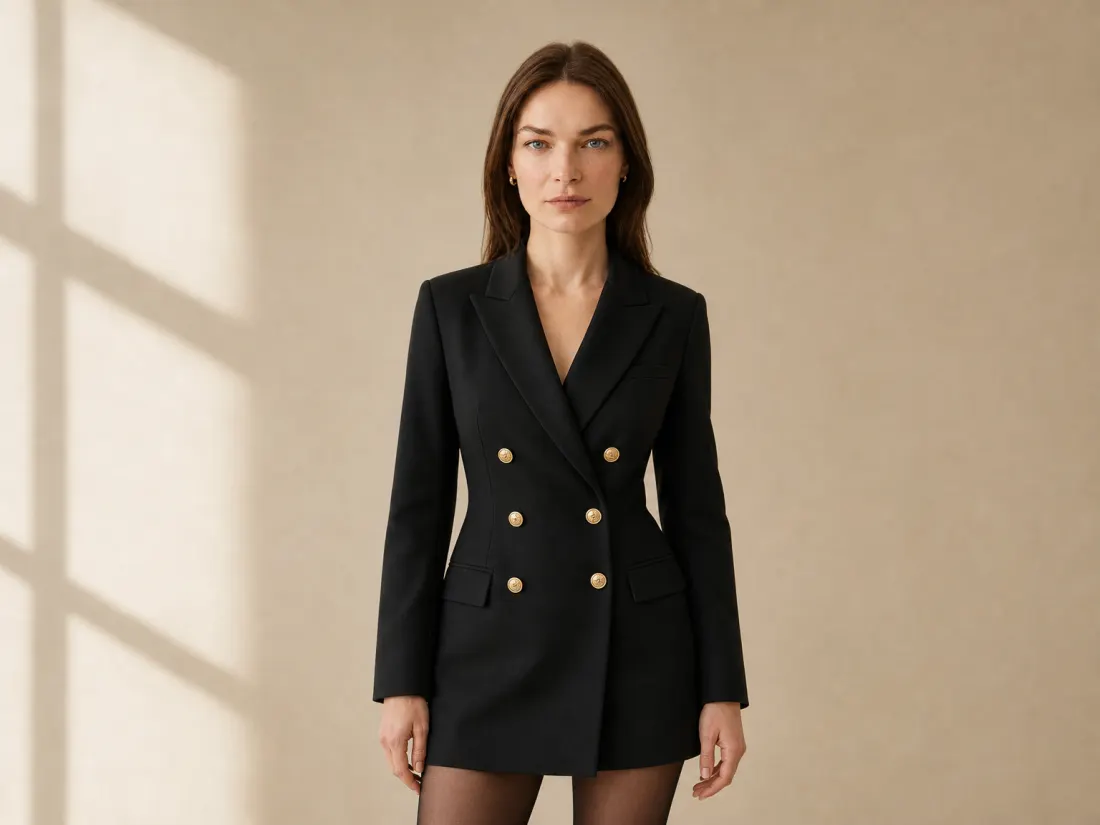
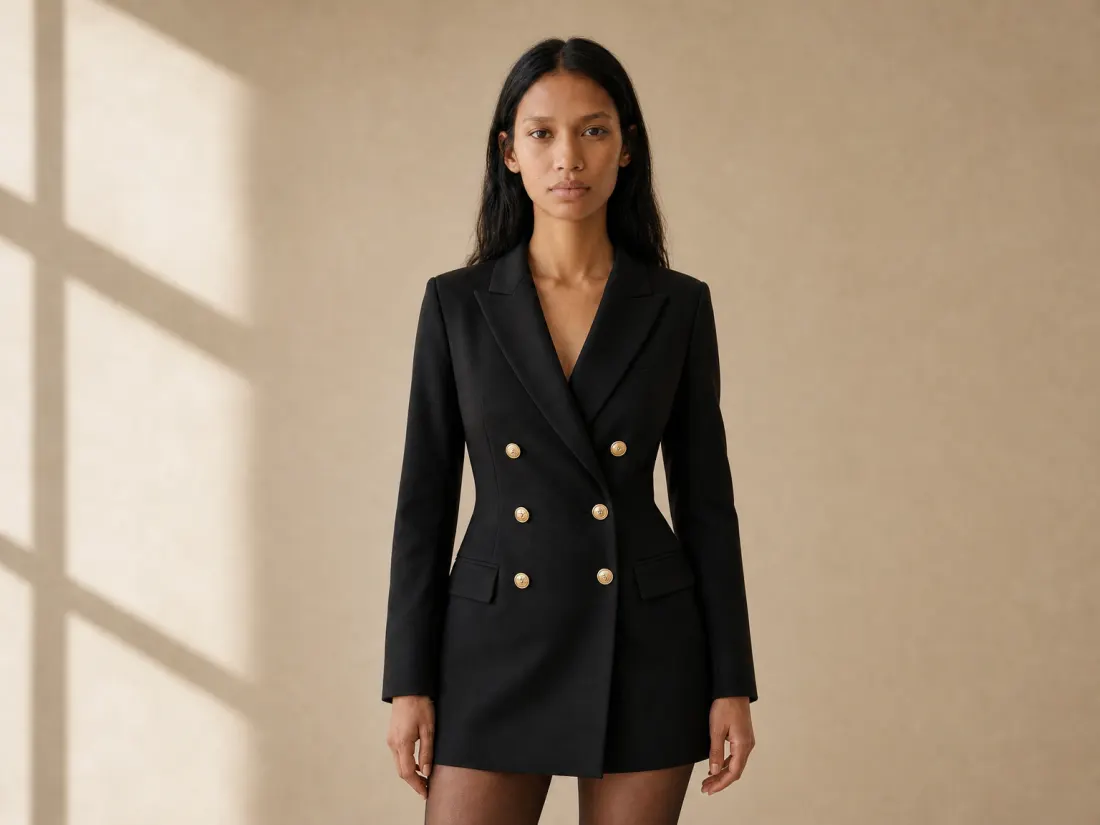
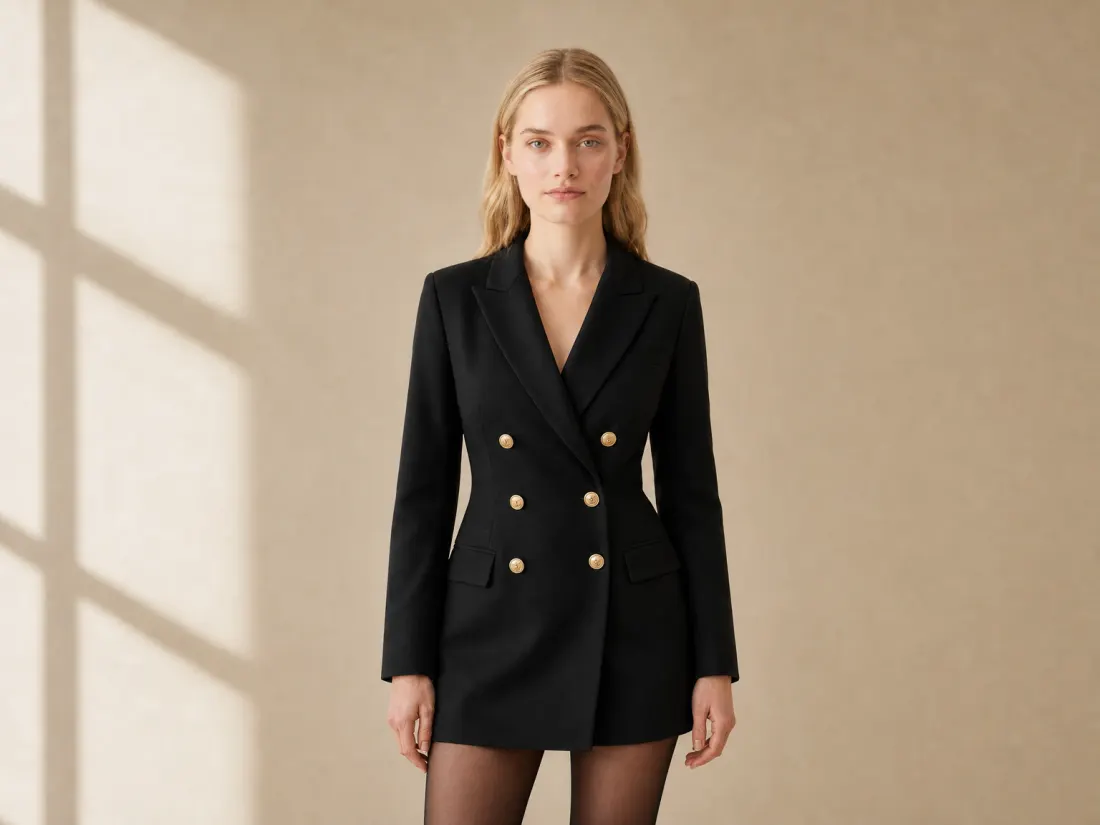
{
  "models": [
    "amara",
    "emma"
  ]
}
One request
Every request is asynchronous: the request returns a job in about two seconds, the images follow in 20 to 90 seconds by webhook or by polling.
curl https://api.garmo.studio/v1/edit/model-swap \
  -H "Authorization: Bearer $GARMO_API_KEY" \
  -H "Idempotency-Key: $(uuidgen)" \
  -H "Content-Type: application/json" \
  -d '{
    "image_url": "https://shop.example/products/blazer-dress-9.jpg",
    "models": [
      "amara",
      "emma"
    ]
  }'
const r = await fetch("https://api.garmo.studio/v1/edit/model-swap", {
method: "POST",
headers: {
Authorization: `Bearer ${process.env.GARMO_API_KEY}`,
"Idempotency-Key": "order-123-model-swap",
"Content-Type": "application/json",
},
body: JSON.stringify({"image_url": "https://shop.example/products/blazer-dress-9.jpg", "models": ["amara", "emma"]}),
});
const job = await r.json();
console.log(job.id, job.status);import os, requests
r = requests.post(
"https://api.garmo.studio/v1/edit/model-swap",
headers={"Authorization": f"Bearer {os.environ['GARMO_API_KEY']}", "Idempotency-Key": "order-123-model-swap"},
json={
"image_url": "https://shop.example/products/blazer-dress-9.jpg",
"models": ["amara", "emma"],
},
)
job = r.json()
print(job["id"], job["status"])<?php
$ch = curl_init("https://api.garmo.studio/v1/edit/model-swap");
curl_setopt_array($ch, [
CURLOPT_RETURNTRANSFER => true,
CURLOPT_POST => true,
CURLOPT_POSTFIELDS => json_encode(["image_url" => "https://shop.example/products/blazer-dress-9.jpg", "models" => ["amara", "emma"]]),
CURLOPT_HTTPHEADER => ["Authorization: Bearer " . getenv("GARMO_API_KEY"), "Idempotency-Key: order-123-model-swap", "Content-Type: application/json"],
]);
$job = json_decode(curl_exec($ch), true);
echo $job["id"], " ", $job["status"];require "net/http"
require "json"
uri = URI("https://api.garmo.studio/v1/edit/model-swap")
req = Net::HTTP::Post.new(uri)
req["Authorization"] = "Bearer #{ENV.fetch("GARMO_API_KEY")}"
req["Idempotency-Key"] = "order-123-model-swap"
req["Content-Type"] = "application/json"
req.body = <<~'JSON'
{
"image_url": "https://shop.example/products/blazer-dress-9.jpg",
"models": [
"amara",
"emma"
]
}
JSON
res = Net::HTTP.start(uri.host, uri.port, use_ssl: true) { |http| http.request(req) }
job = JSON.parse(res.body)
puts job["id"], job["status"]package main
import (
"fmt"
"io"
"net/http"
"os"
"strings"
)
func main() {
body := strings.NewReader(`{
"image_url": "https://shop.example/products/blazer-dress-9.jpg",
"models": [
"amara",
"emma"
]
}`)
req, _ := http.NewRequest("POST", "https://api.garmo.studio/v1/edit/model-swap", body)
req.Header.Set("Authorization", "Bearer "+os.Getenv("GARMO_API_KEY"))
req.Header.Set("Idempotency-Key", "order-123-model-swap")
req.Header.Set("Content-Type", "application/json")
res, err := http.DefaultClient.Do(req)
if err != nil {
panic(err)
}
defer res.Body.Close()
out, _ := io.ReadAll(res.Body)
fmt.Println(res.Status, string(out))
}import java.net.URI;
import java.net.http.HttpClient;
import java.net.http.HttpRequest;
import java.net.http.HttpResponse;
public class Garmo {
public static void main(String[] args) throws Exception {
String body = """
{
"image_url": "https://shop.example/products/blazer-dress-9.jpg",
"models": [
"amara",
"emma"
]
}
""";
HttpRequest req = HttpRequest.newBuilder(URI.create("https://api.garmo.studio/v1/edit/model-swap"))
.header("Authorization", "Bearer " + System.getenv("GARMO_API_KEY"))
.header("Idempotency-Key", "order-123-model-swap")
.header("Content-Type", "application/json")
.POST(HttpRequest.BodyPublishers.ofString(body))
.build();
HttpResponse<String> res = HttpClient.newHttpClient().send(req, HttpResponse.BodyHandlers.ofString());
System.out.println(res.statusCode() + " " + res.body());
}
}{
"id": "job_8Kq2xV7mPz4LtR9wNc3B",
"object": "job",
"tool": "model-swap",
"status": "completed",
"livemode": true,
"outputs": [
{
"id": "out_1",
"status": "succeeded",
"label": "Amara",
"url": "https://….r2.cloudflarestorage.com/renders/2026/11/8f3c…0.webp?X-Amz-Signature=…",
"url_expires_at": "2026-11-20T14:00:00Z"
},
{
"id": "out_2",
"status": "succeeded",
"label": "Emma",
"url": "https://….r2.cloudflarestorage.com/renders/2026/11/8f3c…1.webp?X-Amz-Signature=…",
"url_expires_at": "2026-11-20T14:00:00Z"
}
],
"credits_charged": 2,
"credits_refunded": 0,
"metadata": {
"sku": "DR-123"
},
"created_at": "2026-11-19T14:02:11Z",
"completed_at": "2026-11-19T14:02:58Z"
}Parameters
models | Model ids from GET /catalog/models: Garmo models by name ("klara") or your own models in Garmo Studio ("custom_<id>"). |
Cost
1 credit per model
1 API credit = 1 image. Failed and canceled images are refunded automatically.
API pricingWhat people build with it
Show more people
The same piece on several models for a wider audience.
Market versions
A different model per market from one shoot.
One face per collection
The same Garmo model across every product of a collection.
Questions, answered.
What developers ask before connecting Garmo to a shop or a workflow.
Still stuck? Email usCan I use my own model?
Yes. Models you create in Garmo Studio appear in GET /catalog/models as custom_<id> for your account.
Is it a virtual try-on?
No. It changes who wears the outfit in a photo you already have. To put a product on a model from a flat lay, use Garmo Studio's photoshoot.
What does it cost?
One credit per model.
Other edits in the API
POST /generateClothes color changer APIEvery colorway from one photo, to the exact hex.POST /edit/colorPose changer APIThe back view and the walking shot from one photo.POST /edit/poseGhost mannequin APIThe invisible-mannequin shot, without the mannequin.POST /edit/ghost-mannequinBackground changer APIKeep the subject, change the place, match the light.POST /edit/backgroundBackground remover APICut out products onto transparent, white or a brand color.POST /edit/remove-backgroundImage upscaler API2K or 4K product photos with real material detail.POST /edit/upscaleGet an API key
Test keys are free and need no pack.